Wednesday, August 18, 2010

A Big Thank You to our Growing Community of Bike Map Contributors


When we added U.S. biking directions to Google Maps back in March, we were eager to see the response from the cycling community. Through our partnership with the Rails-to-Trails Conservancy, we had detailed bike lane and trail information for 150 cities; and for the rest of the country, we recommended routes based on other data such as the size of the road, speed of traffic and hill steepness. On one hand, it would’ve been ideal for our directions feature to know about all the bike lanes and trails in the country. But on the other hand, we were aware that biking directions were one of our most-requested features and we wanted to provide information for bicycling fans as soon as possible.

So rather than wait, we decided to launch biking directions in “beta” and ask our community of bicycle-bound users for their help improving our bike maps. Through our “Report a problem” tool, any user can send us corrections or recommend improvements, and receive notifications from Google when their report has been resolved. We always knew the cycling community would be a passionate bunch, but the response to both our biking directions feature and our call to join in the effort to improve our bike maps has surpassed our happiest expectations.

More than 10,000 people have submitted about 25,000 suggestions for improvements to our bike maps. With their help, we’ve added bike lane and trail data for an additional 80 cities since our initial launch. This is an exciting and humbling response from the Google Maps community. It’s like having 10,000 new members of our bike maps team, contributing their time and energy to make Google Maps more useful for everyone.

These contributors have impacted biking directions across the nation - in small and large ways. Here are some examples of suggestions we’ve received:

  • One user simply pointed out to us, “Wall Township Bike path - http://www.wallrec.com/bicycling.htm.” Our response to that short and sweet message? Here it is:


  • Some else sent a note saying, “CSUS - there has been a bike/foot traffic tunnel that connects elvas ave to College town dr for about 6 years. it is located between 64 & 65 st.” Well, that’s handy to know! Done:


  • And yet another user shared, “Cycle/hiking path continues to the East across Switzer and connects with the path that is currently shown on google maps ~2.5 miles to the ENE at 130th and Metcalf Ave. Details on Overland Park website http://www.opkansas.org/Resource_/PageResource/Maps-And-Stats/Maps/Adobe-Acrobat-PDF-Maps/bike_route_plan.pdf Thanks.” Awesome! Overland Park is now looking pretty good for cyclists:


This is how we’ll build a great cycling map: Bit by bit, getting better with every tip and suggestion that users share about the lanes and trails they’ve ridden.

We want to say “Thank you!” to all those who’ve answered our call for bike map contributions. Clearly our users are passionate about helping to make our maps better, so we’re working hard to make the improvement process even easier and to speed up the processing time for user contributions.

In the meantime, happy biking! Just remember that our biking directions are still in beta, and to always use your judgement - don’t ride down any road that makes you uncomfortable. And if we’ve recommended a road that shouldn’t be used by the average bicyclist, let us know!

Monday, August 16, 2010

Making our new building home

This past June, our Geo team finally outgrew our space, so it was time to move to a larger building on campus. To make sure our new building really felt like a home away from home, some of us got involved in the design planning and made it our mission to surprise everyone with a unique, inviting and very Googley new place to work.

We gave the new building a quintessentially Geo feel by putting map-themed artwork in the lobby and halls. We also decided to make quirky, fun places like the “Moon room,” complete with the Earth rising on the wall, moon rocks to nap on, crater-laden carpet and twinkling stars above.


Then we added a Liquid Galaxy for Googlers and visitors to explore Google Earth on eight stunning LCD panels. Given that it’s right next to the cafĂ©, we recommend that you use the Liquid Galaxy before eating, because swooping and zooming around in Google Earth in an immersive panorama can get a little intense.


Despite all of these geographic references, we heard that the new building’s layout had everyone confused! After plastering the walls with building floor plans and “You are here” stickers, we decided on two more creative solutions. First, we designed two “hiking trail” style sign posts for each floor so that folks could quickly find meeting rooms, which we named after famous explorers!


Second, we devised a contest for teams to design “road signs” to hang above their cubes, notifying visitors and lost team members where to find them. Teams had a couple weeks to craft and submit their design for a little friendly competition. While all the signs were being printed and hung, we encouraged everyone in the building to vote for their favorite signs. My personal favorite is the double-sided one created by the Google Earth team.


Photos courtesy of Brian Kiley.

Now, after seeing all the fun signs hanging throughout the building, teams that didn’t participate in the contest are rallying for a second round of sign design. All in all, the dust has settled, and everyone seems quite happy with our new digs.

Friday, August 13, 2010

Google Earth Enterprise 4.0 now available

[Cross-posted from the Google Enterprise Blog]

The Google Earth Enterprise team has long focused on bringing the innovative features of Google Earth and Maps to businesses, enabling them to create their own mapping applications from their existing data archives. Over the years we’ve released new features that have expanded the options for rapid, secure dissemination of geospatial data with Google Earth Enterprise (GEE), and with today’s release of GEE 4.0, we’re happy to announce support for two more important capabilities: mobile-based access to GEE systems, and Google Earth Enterprise Portable Solution. We’re also excited to let you know about the latest versions of the Google Earth Enterprise Client and Plug-in.

Mobile Access to your Globes

In February we released a native Google Earth client for Android
to the Android Market. With GEE 4.0, the Android Google Earth client has been updated to support direct connections to customers’ globes, which permits their end-users to view their organization’s 3D globe, including all imagery, terrain, and vector layers, with support for custom vector search.

Google Earth Enterprise Un-Plugged

Some of you might have heard during a recent Directions Media Webinar that many of our GEE customers need to provide their end users with access to geospatial data for situational awareness, even when those users are in environments with limited or no Internet connectivity. To support this, GEE 4.0 introduces a new feature that permits authenticated end users to extract portions of a published GEE globe -- including all imagery, terrain, vectors, KMLs, and search -- and serve the data locally from their own laptops or other storage devices using a native, cross-platform, light-weight Portable Earth System.

Check out this video to see how the portable capability works.


Google Earth Enterprise Client 5.2
GEE 4.0 also has full support for the new Google Earth 5.2 client, with its many great new features, such as elevation profiles, native MGRS support, client-side data regionation, and the new embedded web-browser.

Google Earth Plug-in Updates
In addition to performance improvements, the latest release of the Google Earth Plugin includes support for historical imagery databases and the ability to connect to multiple globes simultaneously.

Existing customers can find GEE 4.0 upgrade information by logging into the Google Enterprise Support Portal.

Thursday, August 12, 2010

Beachcombing for New Imagery


If you're anything like me, you can't get enough of beaches during the summer months. There are few activities as relaxing as sitting by the water, reading a book, and enjoying a cool beverage. This week's imagery update includes a number of great beaches, so if you live nearby, you may want to go soak up some sun. Just remember to bring your sunscreen!


Chicago, Illinois beach


Goa, India beach


Atlantida, Uruguay beach

Of course, it's only summer in the Northern Hemisphere, so be sure to put Uruguay on your list for future travel rather than flying over there now!

High Resolution Aerial Updates:
USA: Chicago, Stockton, Modesto, Nez Perce (ID), Barre (VT), Orange County (NC), Polk County (FL), Hardee County (FL), Okeechobee County (FL)
Uruguay: Salinas, Atlantida

Countries receiving High Resolution Satellite Updates:
Mexico, Guatemala, Nicaragua, Colombia, Venezuela, Brazil, Peru, Paraguay, Argentina, Chile, Morocco, Libya, Egypt, Senegal, The Gambia, Guinea, Ghana, Burkina Faso, Nigeria, Cameroon, Chad, Sudan, Ethiopia, Djibouti, Kenya, Uganda, Congo, The Democratic Republic of the Congo, Angola, Zambia, Mozambique, Zimbabwe, Botswana, South Africa, Madagascar, Jordan, Syria, Turkey, Russia, Iran, Pakistan, India, Sri Lanka, Bangladesh, China, Myanmar, Thailand, Vietnam, Japan, The Philippines, Indonesia, Australia, New Zealand

Countries receiving Medium Resolution Satellite Updates:
Canada, Guatemala, Belize, Honduras, Nicaragua, Benin, Togo, Ghana, Uganda, Kenya

Right now these updates are only available in Google Earth, but will be in Google Maps soon. For a complete picture of where we updated imagery, download this KML for viewing in Google Earth.

Friday, August 6, 2010

Seeking map data in response to Pakistan floods


According to the UN, the recent floods in Pakistan have affected over 4 million individuals - and the human toll continues to grow. Disease is an ever-increasing risk as relief agencies rush to the aid of those who have been hurt or displaced.

Google’s Crisis Response team has provided satellite imagery and KML layers to assist relief efforts in past disasters, including the Haiti earthquake and recent Gulf of Mexico oil spill. In Pakistan, however, the cloud cover over the impacted areas has inhibited our ability to make this valuable content available. The Crisis Response team is looking to collect and aggregate imagery and user generated KML, or other map data, with the goal of making this content more accessible to both crisis responders and the general public. We’re hoping you can help. You can submit links to KML and map data via the following form. We’ll contact you if we are able to publish your content.


View BKTEF Relief Activity in a larger map

Further, we’ve released a version of our Person Finder tool in Urdu. We realize many of the victims of this disaster lack any connectivity to the Internet, but remain hopeful that tools like this can assist the diaspora and general disaster community in collecting and dispersing information on the well-being of those impacted.


Your data might help relief efforts; we appreciate you sharing it with the world.

Thursday, August 5, 2010

Introducing the Google Small Business Blog


Most every business, including ours, starts small. These days, technology is giving businesses even more ways to grow bigger... faster.

In our recent Small Business series on the Official Google Blog, a handful of real-life entrepreneurs have shared their experiences building companies from scratch and embracing Internet tools that have taken their businesses to the next level. We’ve received fantastic feedback about these posts, and realized that there’s a healthy appetite among small- and medium-sized business owners who want to know all about the latest web tools and tricks. Fortunately, we have lots more to share with you, too!

That’s why we’re introducing the Google Small Business Blog, a central hub that brings together all the information about our products, features and projects of specific interest to the small business community. Rather than having to sleuth around in many different locations for details about templates for creating video ads on YouTube, tips for your employees using Gmail or how to respond to the business reviews on your Place Page, you can find all of this helpful information right here in one place.

Of course, we’ll continue to post relevant news about individual services such as AdWords, Apps, Google Places and YouTube on their respective “home” blogs, but feel free to visit or subscribe to the Google Small Business Blog to get everything relating to your small business needs. We’re starting small today, but who knows what tomorrow will have in store!

Wednesday, August 4, 2010

Respond to reviews for your business on Google Place Page


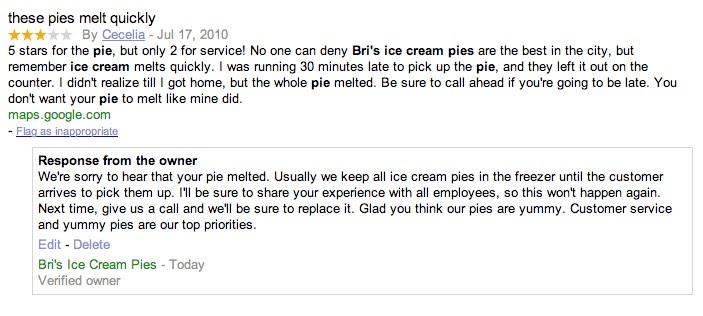
Whether you’re looking for a great lounge to hang out with your friends or a trusty shop to repair your bicycle, the web is a great place to discover and learn about local businesses and services. Some of the listings on Google Maps showcase reviews to help prospective customers make informed decisions and find the places that are just right for them. Reviews on Google Maps are assembled from a variety of sources on the web to give you the best possible overview of what people are saying about a specific place. We also encourage users to share their opinions by writing reviews directly on the Place Page of any place they’ve visited, be it a local business, tourist attraction or the like.

Starting today, if you’re a verified Google Places business owner, you can publicly respond to reviews written by Google Maps users on the Place Page for your business. Engaging with the people who have shared their thoughts about your business is a great way to get to know your customers and find out more. Both positive and negative feedback can be good for your business and help it grow (even though it’s sometimes hard to hear). By responding, you can build stronger relationships with existing and prospective customers. For example, a thoughtful response acknowledging a problem and offering a solution can often turn a customer who had an initially negative experience into a raving supporter. A simple thank you or a personal message can further reinforce a positive experience. Ultimately, business owner responses give you the opportunity to learn what you do well, what you can do better, and show your customers that you’re listening.

Before writing your first response, we recommend reading our handy tips on how to respond to reviewers. Then take a stab at responding by following these instructions. If you have not yet verified ownership for your business on Google, please visit Google Places to claim your listing.