Showing posts with label Google Places. Show all posts

Wednesday, July 27, 2011

Google Maps 5.8 for Android adds photo uploads, My Places, and more


Today, Google Maps 5.8 for Android improves Places and Latitude with:
  • Upload photos for a Place
  • My Places as a simple way to manage the Places you’ve starred and recently viewed
  • Descriptive terms for Places in search results
  • Add a new Place on-the-go when checking in
Photo upload for a Place

When deciding on a place to go, people often want to know what a place looks like in addition to seeing ratings and reviews. You can now contribute photos to help others get a sense of places. You can now attach your photos to Places, and yours may even become the profile picture for that page. If you want to view or delete any photos you’ve contributed to Places, you can manage uploaded photos in the “Photos for Google Maps” album on your Picasa account.
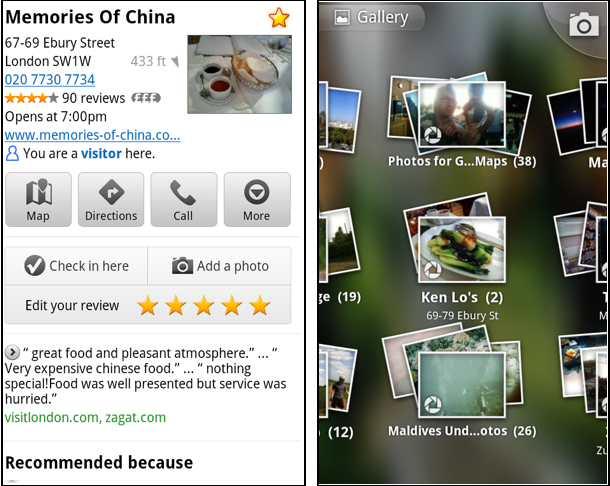
Left: Uploading pictures to a place. Right: Photos in Android Gallery

My Places and descriptive terms for mobile

In June we announced descriptive terms and ‘My Places’ for the desktop. Both these features are now in Google Maps for mobile. Descriptive terms appear in search results for Places to inform you what businesses are ‘known for,’ such as their ‘eggs benedict’ or being ‘worth the wait.’

Also, My Places for mobile provides quick access to starred and recent Place pages you’ve looked at. You can access My Places by pressing your phone’s menu button while in Google Maps.

Descriptive terms and My Places in Google Maps for mobile

Add a new Place ‘on-the-go’ for check-ins

If you’re out and about and want to check in, we want to make sure you can quickly add a new Place to check into if one isn’t available. This might happen for new businesses or those that haven’t set up a Place page yet. For example, let’s say you’re at Xoogle Xtreme Sports, a new sports shop in your neighborhood. You go to check in but don’t see Xoogle in the list of places to check into and when you do a search still nothing comes up.

Add a Place when checking in, if needed

To solve this, you’ll now see an “Add place” option at the bottom of suggested places. Select that option, and you’ll be prompted to confirm the name and location of the new place. Then a brand new place is added (and you’re checked in). This place will be available for you and others to check into from Latitude, but will not appear as a search result in Google Maps or Google Places.

We’ve also added ‘Bigger text’ to our experimental Labs features and ‘Download map area’ has been renamed ‘Pre-cache map area.’

To start using Google Maps 5.8 for Android, download the update here. This update requires an Android OS 2.1+ device and can be used anywhere Google Maps is currently available. Learn more in our help center.

Thursday, July 21, 2011

The Ongoing Evolution of Place Pages


Making constant tweaks and adjustments to our user interfaces and overall user experience have always been the norm at Google, and you may have recently heard about our renewed effort across all Google products to make the user experience more focused, elastic and effortless. Changes have already started to appear on Google Maps, and we’ve now simplified our Place pages across desktop and mobile devices as well.

Some of the changes you’ll notice today have been made so you can quickly get a sense for what other people are saying about a place, more easily upload photos of places you’ve been (by using a more obvious “Upload a photo” button), and see reviews in a single section on the page. Since the introduction of Google Places’ local rating and review feature last fall -- originally called Hotpot -- we’ve heard loud and clear that reviews help you find the places that are right for you, especially when you’re able to get recommendations based on your tastes and those of your friends. So we’ve added the call-to-action “Write a review” button to the top of the Place page to encourage you to tell us what you think about places you’ve visited, while at the same time ensuring that you get personalized recommendations in return when you’re signed in to your Google account.

Based on careful thought about the future direction of Place pages, and feedback we’ve heard over the past few months, review snippets from other web sources have now been removed from Place pages. Rating and review counts reflect only those that’ve been written by fellow Google users, and as part of our continued commitment to helping you find what you want on the web, we’re continuing to provide links to other review sites so you can get a comprehensive view of locations across the globe.


Beyond today’s transition, our long-term vision for local search includes:
  • Bringing you more personalized results when you search for local places -- because we understand that information from the people you know is most meaningful;
  • Integrating some of the great information that’s been buried on Place pages into your web search experience across all Google platforms;
  • Giving you more ways to rate, discover and share places you love faster and easier than ever, wherever you are, and on whichever device you choose.
So whether you’re looking for a great restaurant you haven’t yet tried, or the perfect place to buy a friend’s birthday gift, we hope you continue to find the information on Place pages useful. There have been lots of changes in the nearly two years since Place pages were introduced, and because there’s always more room for improvement, you can expect more changes to come.

Posted by Avni Shah, Director of Product Management

Wednesday, June 15, 2011

My Places now helps you manage your important locations


Almost every day you encounter new places and businesses, whether it’s a new store you spotted on your commute to work, or a restaurant you visited with friends over the weekend. To date, you’ve been able to star places on Google Maps, rate them via Google Places, or add them to a customized map with your own icons and annotations through My Maps.

But keeping track of all the locations you care about and memorizing which places you starred or rated isn’t easy. So today, we’re unveiling the new My Places tab on Google Maps, which helps you quickly view and interact with your saved maps, starred locations, and rated businesses.


The My Places tab replaces the My Maps tab in the Google Maps toolbar. Items are organized by date with your most recent activity at the top, and filters make it easy to sort and view only your maps, starred locations or rated places. And of course, you can still create and share personalized My Maps through the “Create new map” link.

My Places also simplifies your ability to manage the locations that make up your personalized maps experience. Using the drop-down arrow next to each location in your list, you can easily delete any of your saved maps, stars or Google Places ratings. These personalization changes will automatically be synchronized across all other Google properties including Google Places, Google Maps, and Google Maps for mobile.

To use My Places, you’ll need to sign in with your Google account. Try it now: visit Google Maps and click the My Places tab to access and organize the places you care about.

Monday, June 13, 2011

Introducing Descriptive Terms in Local Search Results


(Cross-posted on the Google Places and Small Business blogs.)

Whether it’s to find a great place for dinner or to grab a cup of coffee, I often look up places directly on Google Maps. Evaluating my options and making a choice just got even easier thanks to the list of associated terms that now appears directly in the local search results.

Starting today, Google Maps search results in the U.S. and Great Britain will include some of the phrases which are most frequently used to describe those places. These phrases come from sources all across the web, such as reviews, web pages and other online references, and they can help people quickly identify the characteristics that make a particular place unique. It’s like an opportunity to ask the business owner or its patrons “What’s good here?” or “What do most people get here?”

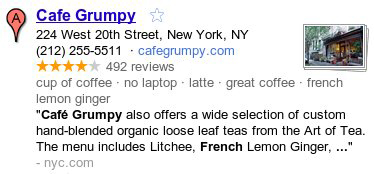
For example, if I’m looking for a place to relax and enjoy a great cup of coffee this weekend, I can see at a quick glance that Cafe Grumpy could be the perfect spot. Besides being known for their “latte” and “great coffee,” they have a “no laptop” policy — exactly what I was hoping for since I’d like to unplug and take a break from work this weekend.


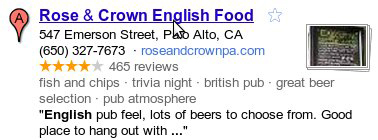
Or if I’m planning to visit friends on the west coast and need to organize a night out, Rose & Crown could be an excellent choice given their “great beer selection” and “trivia night” games on site!


Whether you’re looking for local businesses in your neighborhood or in another city, these descriptive terms can help you find the places right for you. We hope you use these terms to discover new and interesting places on Google Maps, and watch for this feature to appear in Place search on Google.com and Google Maps for mobile soon!

Posted by Manjunath Srinivasaiah, Software Engineer

Wednesday, May 18, 2011

Better access to your content is, well, better


(Cross-posted from the Google Places Blog.)

Google Places makes it quick and easy for you to tell your friends, and the world, what you think about the places you visit.

And since your reviews are your reviews, we figured giving you access to all this content in one convenient way might be helpful. Now, when you visit your profile on Google Places (to find it, click on your picture in the upper left of the screen), you’ll find a link along the left that points to an Atom feed of all the place ratings and reviews you’ve created on Google. The feed address is known only to you, but you are free to share it however you want. So, go on, enjoy your data.

In addition to taking your Google Places ratings and reviews with you, we also thought it’d be useful if you could more easily rate and review on Google the places you’ve found elsewhere in your travels or on the web.

To do that, just find the URL of a public GeoRSS/Atom feed that contains place information you care about. This could be anything from a feed of your Foursquare check-ins to a My Map you may have created years ago. Paste the URL into the search box on Google Places. We’ll show you place cards that line up, as best as we’re able to determine, with the places in the public geo feed. Then, you can rate to your heart’s content.

By making it easier for you take your opinions with you and rate familiar places quickly, we hope you’ll find more places you love, no matter where you may have discovered them.

Posted by Juan Silveira, Software Engineer

Thursday, May 12, 2011

Showcase your business with a 360-degree perspective


When I’m looking for a restaurant in San Francisco, I always browse photos to see if the ambiance is right for the occasion. With our Business Photos pilot, we’ve been photographing businesses, with their permission, to highlight the qualities that make their locations stand out. In addition to the photos that business owners can upload directly through Google Places, these photos help potential customers get a better view of the decor, merchandise, food, and more on each business’ Place page.

Gruhn Guitars Inc. in Nashville, Tennessee, United States

We’ve also been taking 360-degree photography to help businesses owners showcase their locations further, and starting today you can experience that panoramic perspective for select businesses in the United States, Japan, Australia, and New Zealand.

This experience, using Street View technology, includes 360-degree imagery of the business interior and storefront. With this immersive imagery, potential customers can easily imagine themselves at the business and decide if they want to visit in person.

Tenkai, Kyoto, Japan

We’re now starting to make these images available through the Place pages of select businesses we’ve photographed. When 360-degree imagery of a business is available, you’ll see an arrow appear over the thumbnail Street View image on that business’ Place page. Press the arrow to preview the storefront or interior, then click on the thumbnail to see the image in Street View.

Storefront thumbnail for Susan Avery Flowers and Event Styling in Australia

With this pilot, you'll begin to see additional photo experiences on the Place pages of a growing number of businesses. As additional imagery becomes available for more locations in the coming months, you’ll also be able to enter the interior perspective of businesses directly from the Street View images of nearby roads on Google Maps.

We’re continuing this program with businesses in select cities in the United States, Japan, Australia, New Zealand, UK, South Korea, and France. If you would like to highlight your business to Google Maps users, please visit the Business Photos site to learn more and apply.

Posted by Gadi Royz, Product Manager, Google Maps

Friday, April 15, 2011

An Update on Tags


[Cross-posted from the Google Small Business Blog]

As users increasingly rely on tools like Google Maps and Places for information about the world around them, we're working hard to develop products that help local businesses highlight themselves and their offerings.

Last year, we introduced our trial for Google Tags, a way for businesses to highlight their organic Google Places listing with a yellow tag that showcases offers, photos, videos, menu, and reservations for a flat monthly fee.

Since that experiment began, tens of thousands of businesses have used Tags to help potential customers make easier, more informed decisions when searching. Throughout this period, we monitored Tags closely to learn more about our users' business needs and how they used the product.

We’ve made a decision to shift our efforts toward other present and future product offerings for local businesses, and will be discontinuing this trial. To that end, we’ve now halted new signups and will be working with existing participating businesses over the coming weeks to help them meet their marketing needs with other Google products where possible.

We’ve learned a lot from our Tags trial and will take that knowledge into account as we continue to find the best ways to serve users and local businesses alike. Lastly, we want to thank all of the businesses that were part of our Tags trial, and we hope we can meet their advertising needs with one of our existing products.

Posted by Shalini Agarwal, Product Manager

Friday, April 8, 2011

Hotpot is going Places


(Cross-posted from the Google Places Blog.)

Last November, we introduced Hotpot, our recommendation engine to help people discover great new places when they search on Google. It’s simple: Rate and review the places you know, add friends whose opinions you trust and we serve you up personalized recommendations based on those tastes.

Since then, we’ve released an iPhone and Android app, integrated Hotpot recommendations into Google.com and Google Maps, expanded to more than 47 languages and enabled people to share their ratings and reviews to Twitter. While busy iterating on the product side, we’ve also launched marketing and community campaigns in five cities in the U.S.: Portland, Ore.; Austin, Texas; Las Vegas, Nev.; Madison, Wis.; and Charlotte, N.C.

It’s been incredibly exciting to watch Hotpot grow—the community has quickly expanded to millions of users who are rating more than one million times per month and enjoying a truly personalized view of the world. Based on this success, we’ve decided to graduate Hotpot to be a permanent part of our core local product offering, Google Places. Rolling Hotpot into Google Places helps simplify the connection between the places that are rated and reviewed and the more than 50 million places that already have an online presence through Google Places—places that millions of people search for and find every day on Google.


Many of you first asked us at Hotpot’s launch: Why the name? Hotpot, the dish, describes a shared eating experience. To us, the name embodied the communal experience of sharing your ratings and reviews with friends, and getting recommendations in return.

Though the name Hotpot may be going away, you can expect even more “Hotpotness” in Google Places. We have big plans to continue adding more features to Google Places that make it even easier to rate, discover and share the places you love whenever you’re using Google. So stay tuned to the new Google Places Blog for product updates, tips, tricks and news from our city campaigns.

Wednesday, January 26, 2011

Tips for creating a free business listing in Google Places: Adding useful descriptions and relevant categories


(Cross-posted from the Google Small Business Blog)

With this blog post, we’re concluding our three part series about the Google Places quality guidelines. Today, we’ll discuss how to choose the best fitting categories for your business listing as well as how to provide a useful description. In case you missed the first two blog posts, you can find here the first post about business titles and here the second part about business types.


Adding useful descriptions

As a business owner, we encourage you to add a specific description of your business in the “description” field. This gives potential clients more information to understand what your business is about and see if your business matches what they are seeking. You can also use this field to provide further guidance about the location of your business which might be useful in some cases where it is hard to find, e.g. if the entrance of your business is only accessible via the rear.

Keep the description clean and concise, so it is helpful to users and catches their attention. A series of repeated keywords or categories may turn off potential customers, but a crisp and catchy summary of the services you offer help users determine if your business is right for them.


Choosing relevant categories

If you provide appropriate and accurate categories, we can better match your business listing to relevant user searches. We recommend choosing specific categories that describe the core of your business well instead of broad ones. A good way to find representative categories for your business is asking yourself the question “What is my business?” Be sure to capture what your business is as opposed to what it offers or sells - in that sense, “bakery” would be a good category as opposed to “cakes” or “bread”.

Also, do not include location information in the categories field. If you would like to provide such additional information about your business, you can use the description field and, if appropriate, the service areas feature.


You will be asked to choose at least one category from our standard list - just start typing in the categories field to see what is available via the auto-suggestions.


We recommend always choosing the best matching and most specific category for your business - for any specific category, Google will be able to automatically determine the more generic category as well. That means, if you are a Mexican restaurant, you should go for ‘Mexican Restaurant’ and not ‘Restaurant’ - Google then automatically knows that if you are a Mexican restaurant, you are also a restaurant.

You can provide up to five categories for your business listing. After picking a standard category, you can add up to four customized categories. To add another category, just click on ‘Add another category’ and an additional field will be triggered. Put only one category per entry field. Entering more than one category into a category field is not compliant with our quality guidelines and could result in your listing being suspended and not appearing in Google Places. In case you find it difficult to find an appropriate standard category to start with, just pick a category that fits best and add more specific custom categories. If you are uncertain about categorizing your business, you can also ask for advice in the Google Places help forum and discuss with other business owners.


We hope that this information helps you add a concise description and accurate categories to your business listing in Google Places. This gives potential clients more information to determine if your business matches what they are seeking. For further questions you can visit our Google Places help forum.

Posted by Sabine Borsay, Consumer Operations

Tuesday, January 25, 2011

Google Boost: Now Appearing On Mobile Phones


Back in October we announced Google Boost, a new advertising solution to help local businesses connect with potential customers in their area. Today we are excited to announce that Boost ads can appear on Google Search results pages on Android and iPhone devices.


Consumers increasingly use mobile devices to search for products and services, and Boost will give advertisers the opportunity to reach these customers exactly when they are looking for local businesses on their phones. This feature will automatically take effect for current and future Boost advertisers.

In case you aren’t familiar with Boost, it’s Google's new advertising product that helps business owners quickly create an online advertising campaign that targets local customers. Using information from the business’s free Google Places listing, Boost automatically suggests and creates text ads that appear on Google Search and Google Maps results pages.

Google Boost is now available in all U.S. cities to select business types. To find out if your business is eligible, sign in to your Places account (or create a free one if you haven’t yet) and visit the Dashboard. If Boost is not currently available to your business, fill out this short form and we’ll notify you when it is.

Posted by Kiley McEvoy, Product Manager

Monday, January 24, 2011

Share your photos about Places


When looking for information about a place on Google Maps, I immediately look for photos to help decide if it’s the right place for the occasion I have in mind. Whether looking for images of a restaurant’s cuisine, or getting a feel for the ambiance at a local bookstore, photos immediately help me learn more about a place.

A few months ago, we launched an improved photo viewer for Place pages to help you quickly and easily explore images of locations all over the world. Starting today, you can also contribute your own photos of places you've been to the growing collection of high-quality photos across the web.

The “Photos” section of the Place page now includes an "Upload a photo" link. This new link enables you to select an original photo on your computer and easily add it to the group of photos in the gallery.


The most useful photos are descriptive ones that help others experience or envision a place before they visit it in person. It might be a close-up of a popular dish, a wide shot of a business interior, or a picture of the outside of the building.

Photos that comply with our review guidelines will be available in Place page results for that particular business for you and any other potential customers to see. Users will also be able to explore these photos in search results across Google, Google Maps and Google Earth.

We’re eager to see the variety of photo styles and images our users share for everyone to view and enjoy.

Posted by Roland Kehl, Software Engineer

Tuesday, December 21, 2010

Tips for creating a free business listing in Google Places: business types


Are you curious about what kind of businesses are eligible to appear in the free listings that appear on Google and Google Maps? In this second post in our blog series about how to create a clear and effective business listing via Google Places, we’ll help you to determine if Google Places is right for your business.

Business types and models that work with Google Places

Google Places is meant to facilitate customer interaction with brick-and-mortar businesses and service providers. Therefore, the business owner or employee who is officially authorized to represent their particular business location must have a physical address in order to comply with our quality guidelines.

Having a physical address means that your business has a specific location (typically including a street name and a street number), can be visited by potential customers or business partners, and has a specific phone number at that location where you can be reached during operating hours. Including your physical address in your free business listing helps customers figure out where they can find you.

Examples of business listings displayed on Google Maps


Businesses that aren’t right for Google Places

Here are a few examples of business types that are not currently eligible to use Google Places:
  • Web shops that operate exclusively online and have no office for visitor traffic or direct client interaction
  • Businesses without actual physical locations (your living room, the airfield where you offer paragliding lessons, nor the river where your rafting tours start do not qualify as business locations)
  • Companies with non-permanent locations like a farmers market stall, a mobile hot dog vendor, or a one-time concert event at a local café
  • Real estate companies that don’t have a central office and are trying to advertise individual apartments where no one can be reached in person or by phone
For operations like these, rather than appearing in Google and Google Maps search results associated with a physical location, other online tools might better fit your needs. One option is to advertise and generate awareness about your business activities through Google AdWords. This cost-effective program enables you to get the word out about your business, website or event via online ad campaigns, and does not require you to have a brick-and-mortar business address.

How to create a free listing if you’re eligible

If you’re a business with a physical office location that is open to customers and staffed both in person and via phone during regular business hours, we encourage you to create a free listing by signing in to Google Places here. For example, a real estate company with a corporate office can add the services it offers, the apartments it sells, and so on in the description field of the listing.


Be careful to create just one listing per physical location and to create listings only at places where your business is actually located. For example, if you run a DJ service and your office is at 41 Broadway in New York, you should only add that location in Google Places, even if you also DJ at 32 Main Street and at 14 Smith Street.

How to indicate service areas

For businesses that have one physical location but also offer their services elsewhere - such as the aforementioned businesses as well as locksmiths, translation services, delivery pizzerias, cleaning services and the like - you can use the Service Areas feature in your Google Places account. Marking a service area enables you to show your potential customers the range of places where you work.


Businesses that require travel to meet customers can define a radius around their main location or select specific areas they serve. If your main location is your home address and only used to receive business-related mail and phone calls, you can also hide that address and only show the service area in which you operate. This might be the case for babysitters, DJs, household services or IT repair services. Detailed instructions about how to set up this feature can be found in our help center.

Taxi and courier companies are particularly good examples for the use of the Service Areas feature. They offer a service that is location-independent and therefore shouldn't be associated with fixed locations on Google Maps. Even if you can find taxis often in front of train stations or airports, these are not locations owned by the business. The service area feature allows taxis to indicate the area in which they operate. If the taxis are coordinated over a dispatch centre, that can be listed as one physical location, otherwise the address should be hidden.

How to verify a listing

In order for your free business listing to appear on Google and Google Maps, you must verify your business via Google Places. This simple process includes providing a verification code by mail, automated call or text message. The phone number used for this process will be shown in your listing, so be sure that the number directs calls to your business.

We hope this information helps to explain our Google Places quality guidelines around setting up a free business listing. If you have any further questions about the types of businesses that are eligible for inclusion in Google Places, please visit our Google Places help forum.

Posted by Lina Paczensky, Local Search Quality

Thursday, December 9, 2010

Trailblazing in Portland

[Cross-posted from the Hotpot Community Blog]

When we announced the availability of Hotpot last month, we knew from the beginning we were going to take a different approach to marketing the product and engaging with our users, both businesses and consumers.

To that end, we’re excited today to start testing this new approach by launching our first local marketing campaign in Portland, Oregon. Portland is a tech savvy, forward-thinking city with a history of innovation and some of the best coffee houses, microbreweries and parks in the country. Whether you know it as The City of Roses, Stumptown, P-Town, Rip City or just PDX, Portland’s thriving local business community and strong heritage of being a trailblazer made it a great choice for us to try something new.

So starting today and over the course of the next few months, we’ll be out and about in Portland. Here’s a taste of what’s in store:

Business Kits and Window Decals


Every day millions of people search on Google.com to find local businesses, and we want to make it seamless for standout businesses to get discovered online. To achieve this, we’ll be working directly with some of Portland’s top businesses to educate them about Google Places for business and all its benefits. In addition, to help these businesses spread the word, we’re providing owners with special Google Places Business Kits. These kits are a multi-flavored sampler of marketing materials that can help businesses get even more exposure, get them rated and reviewed online, and get more customers through their door. We’re already distributing these to some of Portland’s top businesses, but any business in Portland who has claimed their Place page can request a box.


A central part of the kit is the bright red “Recommended on Google” window sticker. This is not your ordinary sticker. Unlike others, this is an interactive sticker that has Near Field Communications (NFC) technology built right in, allowing people with cutting edge phones like the Nexus S to simply touch their phones to the sticker to find out more information about the business. Suddenly stickers are cool again!

Community Events


Sure, Hotpot’s about sharing recommendations with friends online. But we thought it’d be fun to take things offline. To kick things off, we’re partnering with Portland’s beloved Voodoo Doughnut. Because we at Google are such big fans of their tasty treats, we wanted to spread the love — so if you like doughnuts and coffee, be sure to stop by both locations starting this Saturday at 10am for a special treat.

Hotpot Jackpot


We’re also launching our second Hotpot Jackpot competition to encourage Portlanders to start rating the places they know and share them with friends and family. Everyone over the age of 18 who lives within a 50-mile radius of Portland can participate, and the top five raters at the end of the competition will win dinner for 10 at any restaurant in Portland, courtesy of Google. To kick things off, all of the fans at tonight’s Trail Blazers vs. Magic game will receive t-shirts announcing the competition and supporting the Blazers.

This is just the beginning and we’ll be doing a lot more in the upcoming months. For the latest and greatest of what we’re up to in Portland (and elsewhere), keep an eye out by staying up to date via the Hotpot Blog, and by following us on Twitter and liking us on Facebook.

Posted by Bernardo Hernandez, Director of Emerging Marketing

Friday, December 3, 2010

How Local Search Ranking Works


We’ve been quite busy this year working on Google Places, Tags, Boost, and our shiny new addition: Hotpot. With so many different products and features now available for local businesses, we wanted to take a step back and explain how the ranking of local listings works when people search on Google and Google Maps.

Product Manager Jeremy Sussman takes us under the hood in this informative video. Below are a few key takeaways, but we encourage you to watch the video, which features helpful examples and visuals.


Local search ranking refers to the placement and order of local information on a Google or Google Maps organic search results page. There are a variety of factors we take into account to provide you with results that match your local search, and three of the primary signals are relevance, prominence and distance. The best way to help potential customers connect with your business is to ensure that your basic company information like its name, address and phone number, are accurate, and then to add rich details like photos, hours of operation and more. You can do this by claiming and verifying your business via Google Places. However, claimed business listings do not receive any special ranking treatment over unclaimed business listings.

Google Tags and Boost are great online advertising solutions for local businesses. Tags make your organic business listings stand out on the Google and Google Maps search results page with a bright yellow marker that highlights specific attributes such as offers, videos or photos. And Boost is an effective complement to your organic Places listing because it quickly and easily creates an ad that can appear alongside the search results - giving your business additional exposure to people searching online. Neither of these advertising products available through your Google Places account affect the organic ranking of your business listing on Google or Google Maps.

Conversely, Hotpot - our new local recommendation engine based on ratings from you and your friends - can definitely affect the ranking of the local businesses you see in your organic search results. If you’re signed in to your Google account and have enabled Hotpot, you’ll get personalized recommendations based on the ratings you and your friends provided - making it easier for you to discover new places you’ll enjoy.

Posted by Brianna Brekke, Senior Strategist, Google Places

Tuesday, November 30, 2010

Video: How To Hotpot

[Cross-posted from the Hotpot Community Blog]

As you know, we recently announced the launch of Hotpot, our new local recommendation engine for Google Places, powered by you and your friends. In the following video, Mat Balez, a Google product manager, talks more about how to find the places you'll love using Hotpot.


Posted by Vanessa Schneider, Hotpot Team

Tuesday, November 16, 2010

Google Boost: Now available in additional U.S. cities


We recently announced that our new search advertising program, Google Boost, is available to local businesses in San Francisco, Houston and Chicago. Based on the great feedback and results from early participants, the beta is expanding to additional U.S. cities. Starting today, select local business owners can sign in to their Google Places account and try Boost if they’re located in San Jose, Seattle, Wichita, Charlottesville (VA), Atlanta, Chapel Hill, Orlando, Washington D.C., Boston, Cross Plains (TX) and Portland (ME). We’ve also made Boost available for all local businesses in Illinois.

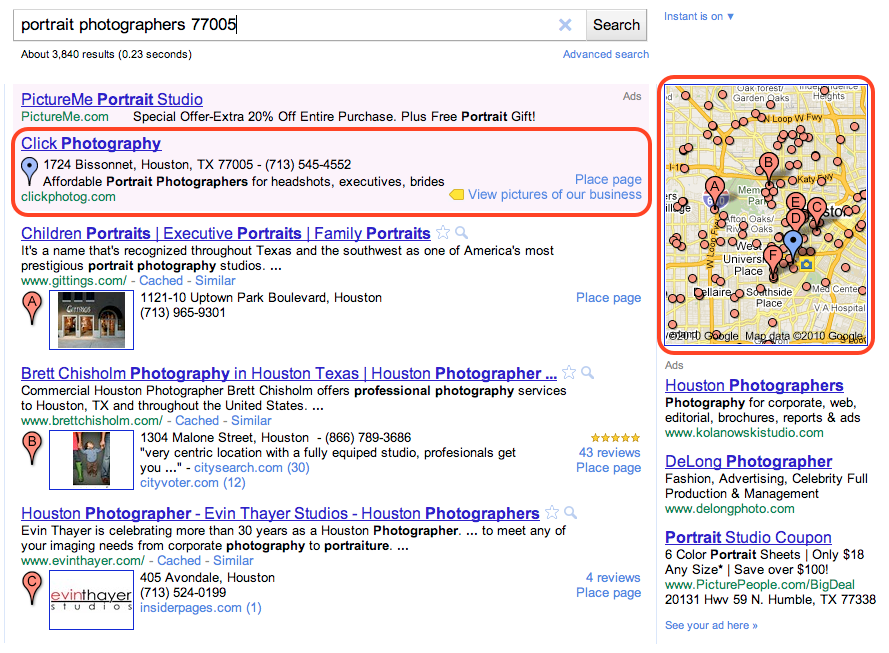
A Boost ad for Houston-based Click Photography, and it’s corresponding blue map pin

For those of you who are not yet familiar with Boost, it’s a quick and easy way for local businesses to market themselves and connect with potential customers in their area. Based on the information you’ve already provided on the Place page for your business, we provide a suggested ad description, a web or Place page, your business categories and a monthly budget. Once you’ve confirmed these four simple elements, our system automatically creates an ad campaign. Your ad may start appearing almost immediately when people in your area search online for products and services related to your offering. And what’s more, you’ll only pay when a potential customer actually clicks on your ad. To be clear, the ranking of Boost ads in the “Ads” section of the Google.com and Google Maps search results pages are based on relevance and quality factors; and Boost ads do not impact the ranking of your free, organic business listings.

Over the next week, eligible businesses in the cities mentioned above will see an invitation to try Boost when they sign in to their Google Places account dashboard. Business owners located outside of these areas can fill out this form to be notified when Boost expands further to their regions.

Posted by Kiley McEvoy, Product Manager

Monday, November 15, 2010

Discover Yours: Local recommendations powered by you and your friends


There’s something so exciting about discovering new places. Nothing beats finding a great new place I’ve never been—whether it’s a new bakery with a special dessert, a hole-in-the-wall Mediterranean place I didn’t notice before or a local art gallery where I can let my imagination roam free.

The challenge with finding those great places is that each of us has different tastes. I want to find places I like and I want to find them quickly. So when I’m overwhelmed with possibilities, I turn to sources I can trust. For example, if I’m in a new city, I might chat with the concierge at my hotel and explain to him the kinds of places I like so he can give me personalized recommendations, or I’ll ask my friends for local recommendations because I value their opinions and we have similar tastes. But finding trusted advice is hard; wouldn’t it be great if there was a way for me to get these recommendations all the time, everywhere I go?

We are trying to do exactly that, and today we’re excited to share the first step: an early release of Hotpot - a local recommendation engine powered by you and your friends. With Hotpot, we’re making local search results for places on Google more personal, relevant and trustworthy. There are three main ingredients in the Hotpot recipe:
  • Google Places - These are the 50 million places around the world for which we have rich details.
  • The places you like - When you rate places you like, we’ll tell you about other related places you’ll love. I love my favorite neighborhood restaurant in Noe Valley, Firefly, so when I rate it 5 stars, Hotpot will try to recommend other places for me in the city with simple, homey food such as Home restaurant.
  • The places your friends like - Share your ratings with your friends and see the places they’ve recommended. I’m planning a trip to Barcelona for the holidays and my friend Bernardo is a local. With Hotpot, I can see his recommendations when planning my trip on Google Maps, or when I’m in Spain using Google Maps or Places for Android.

Combining these three ingredients makes the hard task of choosing where to go easy; all you need is to rate places and add your friends. To do that we created the Hotpot rating app: quickly rate all the places you’ve been to and choose exactly which friends you want to invite to Hotpot. Then, when you’re visiting places, you can continue rating on the go from Mobile maps on Android.

Rate from the Hotpot rating app


Rate from Mobile maps on Android

Your recommendations are with you whenever you need them. In search results, you can see recommended places by using the new Place Search and clicking on the “Places” filter. You can also see recommendations when searching on Google Maps, Google Maps for Android or when checking the Place pages for a specific business.

Recommendations on Place Search


Recommendations on a Place page


Recommendations on Google Maps for Android

You can set a Places nickname (here’s how) when you start using Hotpot, so you control how you post your ratings. That way, only your friends will be able to see your real name.

Happy hotpotting!

Posted by Lior Ron, Product Manager

Monday, November 1, 2010

Google Places now more widely available in Asia


People often use the Internet to look for businesses in their nearby vicinity. For example, a mother in Karachi might be trying to find a dentist for her teenager, or a young professional in Colombo may find himself in need of a computer repair shop. People also go online to research places they might visit when traveling, such as a dive shop in Palau, a backpacker hostel in Kathmandu, or a cooking class in Phnom Penh.

Because of this increasing trend in which people search online to find local establishments, business owners all over the world are realizing how simple and easy it is to reach their target customers through free business listings on Google.com and Google Maps. We’ve been gradually expanding access to our online database of local information, called Google Places, and it has recently become available to businesses and locations in 30 additional countries in Asia.

Example of business listings displayed on google.com

If you haven't already claimed your free listing in Google Places, doing so can help ensure that customers see accurate information about your business, and increase your likelihood of being found from desktop and mobile devices - even if you don’t have a website. With your free Google Places account, you can:
  • Be found: Verify your information to make sure people can find you on Google
  • Stand out: Engage customers with photos, coupons, custom posts on your Place page and more
  • Get insights: Use info about your listing to make smarter business decisions
Any
business located in a region where Google Places is available (now more than 100 countries) can sign in to Google Places at any time to claim or update their listing. And for those of you specifically located in South Asia (Pakistan, Sri Lanka, Bangladesh, Maldives), Southeast Asia (Macau, Cambodia, Myanmar, Brunei, Laos), Western Asia (Kazakhstan, Uzbekistan, Kyrgyzstan, Tajikistan, Turkmenistan), North Asia (Nepal, Afghanistan, Bhutan, Mongolia), and the Pacific (Fiji, French Polynesia, New Caledonia, Guam, Papua New Guinea, Northern Mariana Islands, Vanuatu, Solomon Islands, Tonga, Samoa, American Samoa and Palau), we warmly welcome you and invite you to check it out!

Posted by Andrew McGlinchey, Product Manager

Thursday, October 28, 2010

New in Google Maps for Android: Updated reviews, search filters, and Latitude real-time updating

[Cross-posted from the Google Mobile Blog]

Lately, we’ve been working on giving you even better ways to find nearby places with Google Maps for Android, such as the Places icon and rich Place pages. Today, we are launching Google Maps 4.6 with a new design for Place page reviews, more options to filter search results, and a Google Latitude real-time updating option.

Place page reviews
Now, you’ll see that Place pages on Android Maps share the same new design for displaying reviews as used by Place pages on your computer. You can see:
  • “Reviews from around the web” for highlighting sites that have high-quality reviews about the place.
  • “Reviews from Google users” for reviews posted directly to Google Maps by other users
Filter search results
Of course, you’ll first need to narrow down which Place page reviews to check out. In addition to distance and ratings, you can also filter results for some searches by:
  • Open now
  • Neighborhood
  • Related searches

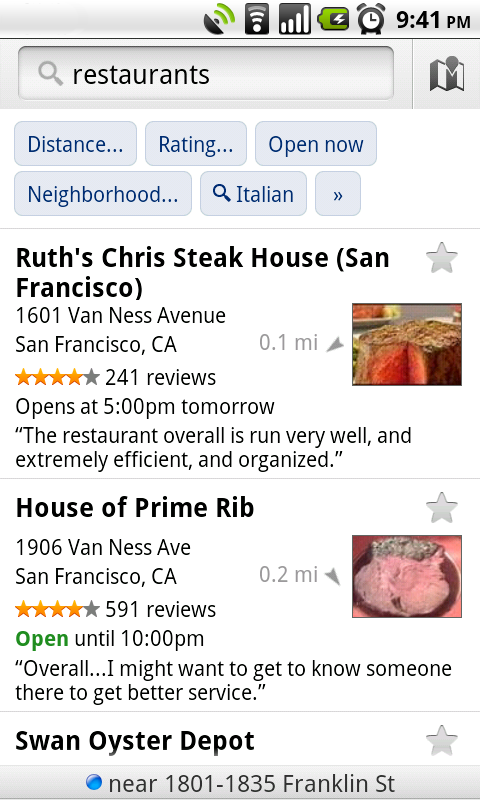
Find the right place with the updated reviews section (left) or search results filters (right).

Google Latitude real-time updating
In Latitude, you can also choose an experimental “Real-time updating” option from an individual Latitude friend’s profile page to help meet up with them by temporarily seeing faster location updates (friends must have Maps 4.6 and Android 2.2+).

Get Google Maps 4.6 for Android 1.6 and above everywhere Maps is already available. Just search for Google Maps in Android Market (or tap here from your phone).

Visit our Help Center to learn more or tell us your feedback and questions in our Help Forum.

Tuesday, October 26, 2010

Business Photos from Google are now on Place pages


Six months ago, we announced the pilot of a project to take photos of business interiors. Through this program, business owners located in the U.S., Australia and Japan could invite our photographers into their establishments to take high-quality images of their businesses. Excitement from interested business owners grew quickly, and we’ve since taken photos of businesses in about 30 cities.

Starting today, the images we’ve taken as part of the pilot can be viewed on the Place pages of participating businesses. Users and potential customers who look online for local businesses can now see more high-quality photos that give them a sense of what a place is really like. The photos may include the storefront, decor, layout, merchandise, food, signage about hours and accepted payment types, and other items that help people learn more about a business and decide if they want to go there. For example, if you’re looking for the perfect restaurant to make a good impression on a first date, the high-quality interior photos might help you decide if the ambiance and atmosphere of a particular place are right for the occasion you’re planning.

Here are a few examples of these high-resolution photos:

法善寺横丁 正弁丹吾亭, or Shoben Tango Tei, an authentic Japanese restaurant in Osaka, Japan


Pane e Vino, an award-winning Italian Restaurant in San Francisco, CA


Susan Avery Flowers and Event Styling, a wedding services, event planning and florist shop in Sydney, Australia

Business owners who worked directly with our photographers across these three regions will see the photos from Google on their Place page within the coming weeks. Thanks to all of you who welcomed us into your businesses. We’re continuing to take photos at more business locations, and urge others to let us know if you’d like us to visit you as well.

In the meantime, you can also upload your own photos and videos of your business by signing in to Google Places. By building out your Place page with visuals and other relevant business information - such as hours of operation, offers and more - you’ll help potential customers learn more about you and feel like they know what to expect when they actually walk through your doors.

Posted by Gadi Royz, Product Manager